
AI Flashcard Generator: Create Flashcards Online Free
VisualNote AI is a flashcard maker online that does the boring half of studying for you. Paste your notes, upload a PDF, or drop in a YouTube link, and you get two things back: a visual summary of the material, and a flashcard deck written from the same source.
What is an AI flashcard generator?
A flashcard is a question on one side and an answer on the other. That format works because it forces you to retrieve the answer from memory before you check it, and retrieval is what actually builds recall. The problem has never been the format. The problem is that writing forty good cards from a chapter takes longer than reading the chapter did, so most people skip it and go back to re-reading, which feels productive and mostly is not.
An AI flashcard generator removes that cost. It reads your source material, finds the facts and relationships worth testing, and writes them as question and answer pairs. VisualNote AI goes one step further by generating the deck alongside a visual summary, so the same material reaches you twice, once as a picture of how the ideas connect and once as a set of questions that check whether it stuck.
Everything happens in the browser. There is nothing to install, and you can create flashcards online free before you decide whether you want more generations.
How it works
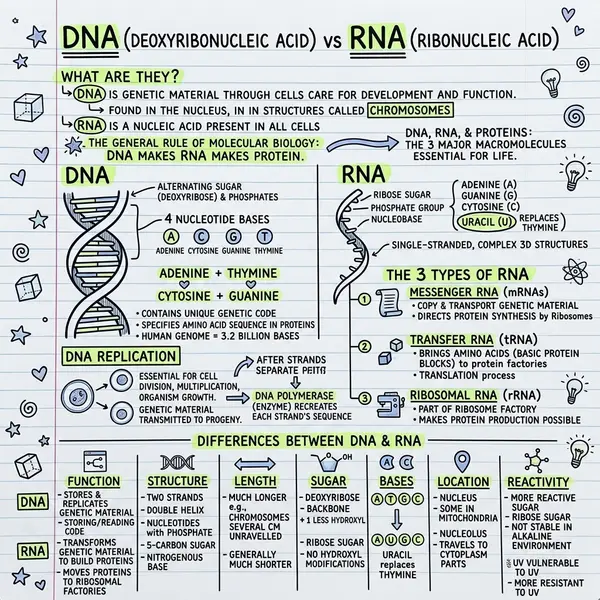
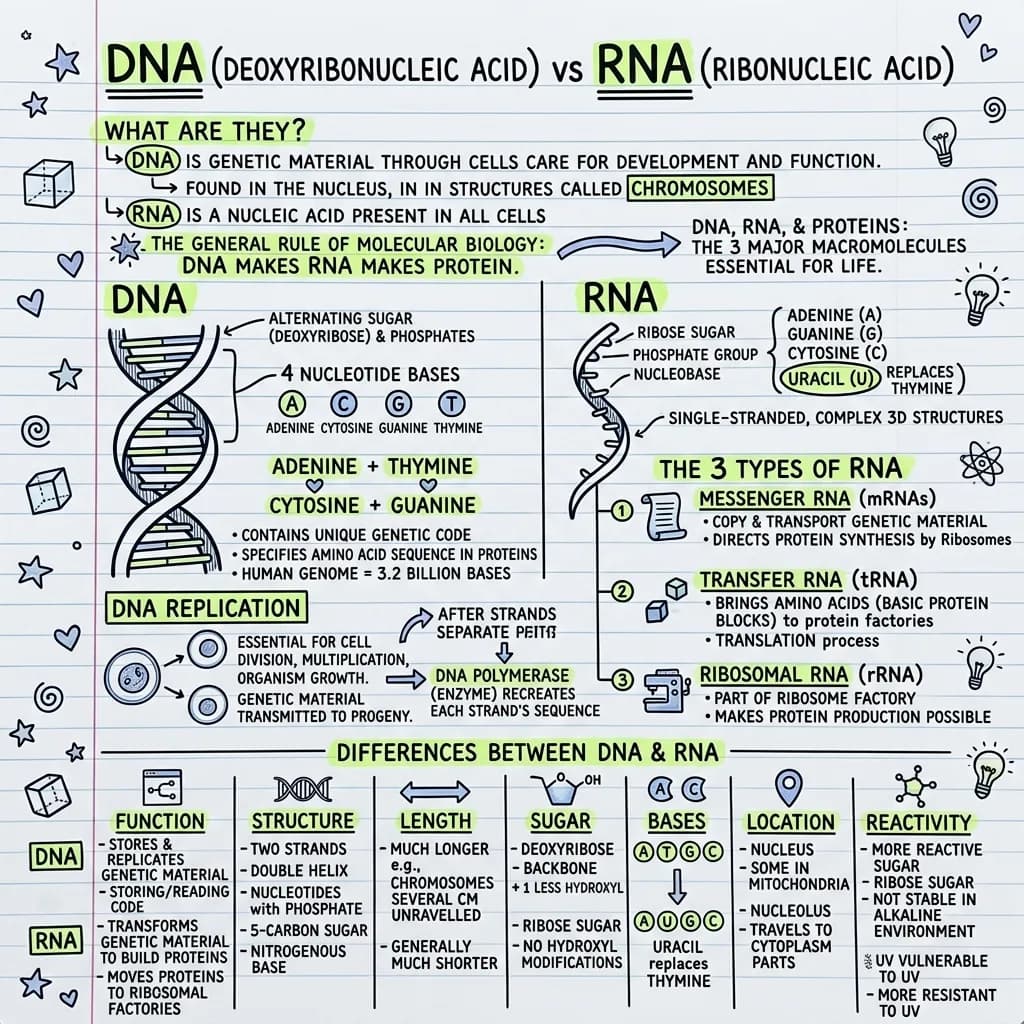
An example deck: DNA and RNA
Six of the cards generated from the molecular biology notes above, exactly as they came out.
DNA is a double helix: two complementary strands wound around each other. RNA is normally a single strand that folds back on itself into loops and hairpins.
In DNA, adenine pairs with thymine and guanine pairs with cytosine. RNA has no thymine; it uses uracil instead, so adenine pairs with uracil.
Messenger RNA carries the coding sequence out to the ribosome. Transfer RNA brings the matching amino acid. Ribosomal RNA forms the working core of the ribosome itself.
The helix is unzipped and each old strand is used as a template for a new complementary one. Every daughter molecule ends up with one original strand and one new strand.
DNA uses deoxyribose, which is missing an oxygen at the 2 prime position. RNA uses ribose, which keeps that hydroxyl group.
The missing 2 prime hydroxyl leaves nothing to attack the backbone, and the second strand shields the bases. RNA keeps that hydroxyl, so it breaks down faster, which suits a short-lived working copy.
Four ways to take your deck with you
A deck that only lives inside one website is a deck you will stop using. Every deck downloads in four formats, and each one is meant for a different way of studying.
What one run produces
Each one opens the full visual and the notes the deck was written from.
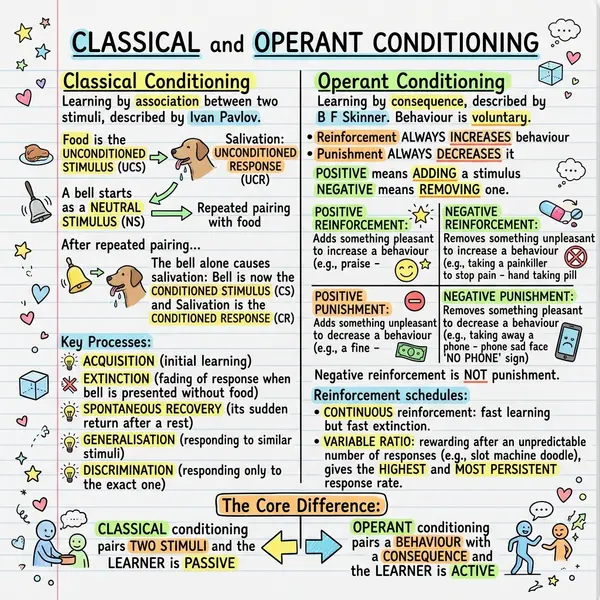 Classical vs operant
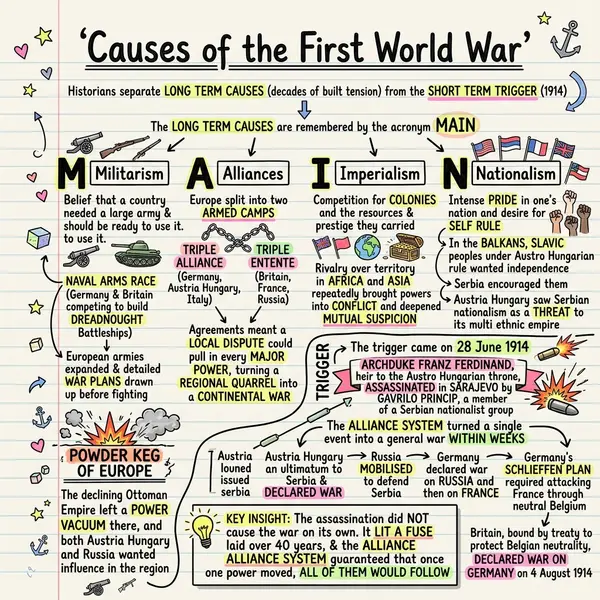 Causes of WWI
Free to start, no credit card
New accounts get free generations, and a generation covers both halves of the job: the visual summary and the flashcard deck built from the same source. You do not enter card details to try it, and you do not have to pick a plan before you know whether the output is any good for your subject. Bring one real chapter, run it, and judge the deck on your own material.
If you run out and want more, the pricing page lists what each paid plan adds.
One folder per class. It fills itself.
- Chapters file in the order you add them, one paste per chapter.
- Style, page ratio and language are set once on the course and reused for every chapter.
- The chat starts from the chapters in the folder and says when it goes beyond them.
- A quiz per chapter. Every miss is recorded on the card as a weak spot with a count.
- Put the exam date on the folder and it stays in view while you work.
Free plan: one course, three chapters, no credit card. See how courses work
Questions people ask
Yes. Every new account starts with free generations and no credit card is required. Each generation gives you the visual summary and the flashcard deck that goes with it.
A deck holds up to 30 cards. If the first pass misses something, you can regenerate the deck or append more cards to the one you already have.
Yes. Upload a chapter, a paper, or a set of lecture slides saved as a PDF, and the deck is written from the same text that produced your visual.
Download the deck as CSV, then import that file into Anki and map the first column to the front of the card and the second to the back. The same file opens in Excel and Google Sheets.
No. The interactive HTML download is a single self-contained file. Save it once, open it in any browser, and it works with no account and no internet connection.
Make your first flashcard deck free
Bring a chapter, a set of notes, or a lecture video. You get the visual and the deck in the same run.