
S/MIME Email Security — Visual Explainer & Notes
How S/MIME secures email — digital signatures, encryption and certificates — turned from textbook prose into a single explainer diagram.
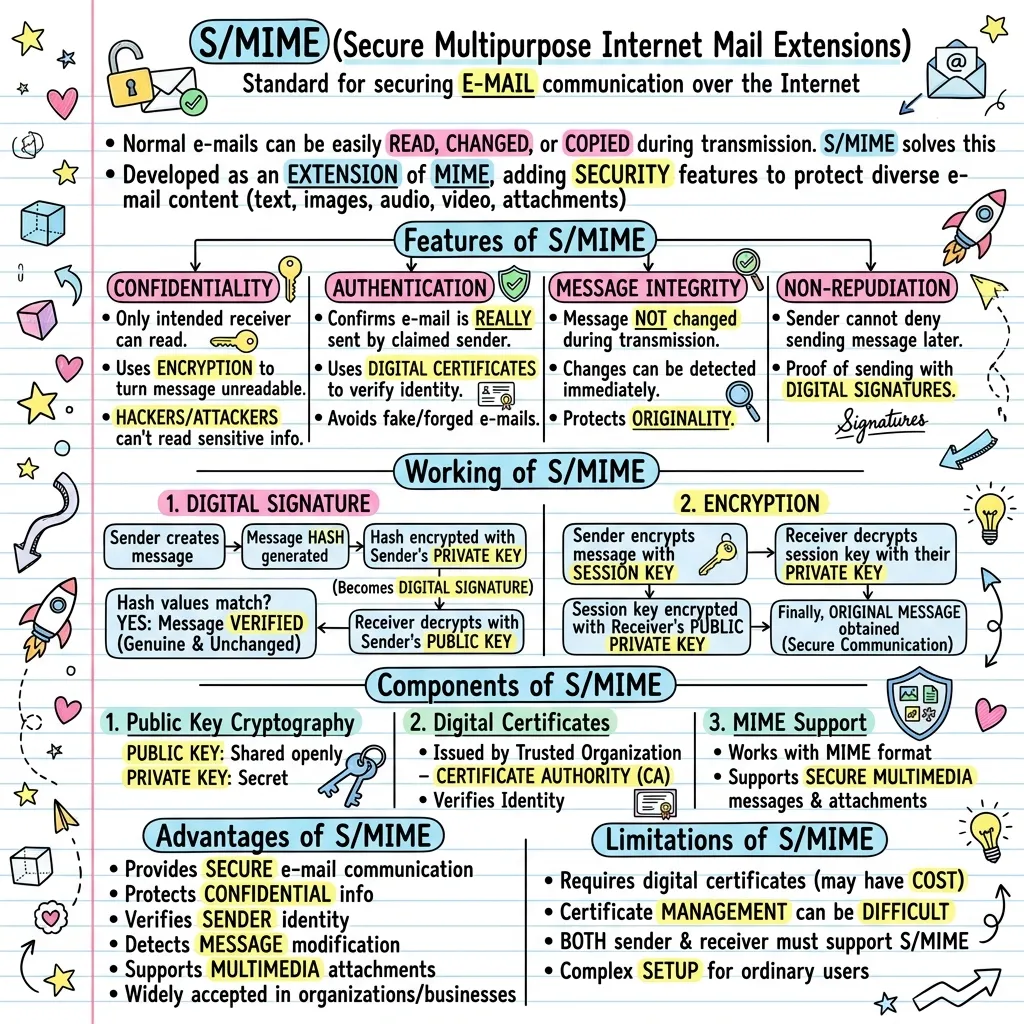
S/MIME stands for Secure Multipurpose Internet Mail Extensions. It is a standard used to provide security to e-mail communication over the Internet. Normal e-mails can easily be read, changed or copied during transmission, and S/MIME solves this by providing encryption, authentication, message integrity and digital signatures. It was developed as an extension of MIME, which allows e-mails to carry text, images, audio, video and attachments. The features of S/MIME are confidentiality, authentication, message integrity and non-repudiation. Its working involves two techniques: a digital signature, which hashes the message and encrypts the hash with the sender's private key, and encryption, which uses a session key encrypted with the receiver's public key. Components include public key cryptography, digital certificates issued by Certificate Authorities, and MIME support. It has advantages and limitations.
What's in this visual
S/MIME is a common email-security topic, and one that loses students fast — it stacks four security goals, two cryptographic workflows and a set of components into one chapter of dense prose. The diagram above takes the same content and lays it out as flows: what S/MIME guarantees, and the step-by-step processes that deliver it. Here is the full breakdown.
What S/MIME is
S/MIME stands for Secure Multipurpose Internet Mail Extensions, a standard for securing email across the Internet. The problem it solves is real: an ordinary email can be read, copied or altered by anyone who intercepts it in transit. S/MIME was built as an extension of MIME — the standard that lets messages carry text, images, audio, video and attachments — and it adds a security layer on top, so the same multimedia email is now encrypted, authenticated and signed. Understanding it as 'MIME plus security' is the cleanest way to frame the whole topic.
The four security features
S/MIME delivers four guarantees, and they map neatly to the four classic goals of secure communication. Confidentiality means only the intended receiver can read the message, achieved by encrypting it into an unreadable form. Authentication confirms the email genuinely came from the claimed sender, using digital certificates. Message integrity ensures the content was not altered in transit — any change is detected on receipt. Non-repudiation means the sender cannot later deny sending the message, because the attached digital signature is proof of origin. Together they cover secrecy, identity, tamper-detection and accountability.
How a digital signature works
The digital signature verifies the sender's identity and the message's integrity. The process runs in clear steps. The sender writes the message, and a hash value — a compact fingerprint of the content — is generated from it. That hash is then encrypted with the sender's private key, and the encrypted result is the digital signature, attached to the email. On the other side, the receiver decrypts the signature using the sender's public key to recover the hash, and re-hashes the received message. If the two hash values match, the message is verified as genuine and unchanged.
How encryption works in S/MIME
Encryption is the separate process that keeps the message secret, and S/MIME uses a hybrid approach for speed. The sender first encrypts the message with a fast, randomly generated session key. That session key is then itself encrypted using the receiver's public key, and both the encrypted message and the encrypted key are sent. The receiver uses their private key to decrypt the session key, and then uses the session key to decrypt the message back to its original form. Combining symmetric and public-key cryptography this way is what makes secure email both safe and practical.
Components, advantages and limitations
Three components make S/MIME work: public-key cryptography, with a freely shared public key and a secret private key; digital certificates, issued by trusted Certificate Authorities (CAs) to verify identity; and MIME support, so secure multimedia messages and attachments are still possible. Its advantages are clear — secure, private email, verified senders, tamper detection and broad acceptance in business. Its limitations are equally worth knowing: certificates can cost money and are awkward to manage, both sender and receiver must support S/MIME, and the setup is complex for ordinary users.
Why process-heavy topics belong in a visual
S/MIME is two ordered processes — signing and encrypting — described in plain notes as numbered lists you must mentally animate. A diagram draws each workflow as an actual flow: message, hash, private-key step, signature, then verification on the other side. The two key pairs, the session key and the direction of each step are seen rather than tracked in your head. For revision you follow the arrows, and the difference between a signature and encryption stops being a thing you confuse.
For teachers
The problem
- S/MIME bundles four security features with two multi-step cryptographic workflows into one demanding lesson.
- Students mix up the digital signature and encryption because both use key pairs and read similarly in notes.
- Drawing two clear, parallel process flows on the board legibly is slow and rarely fits.
How to use it in class
- Hand it out as a one-page revision sheet before the email security or cryptography exam.
- Project the signing flow and walk the class step by step from message to verification.
- Use the two workflows side by side to make the signature-versus-encryption distinction explicit.
- Blank the steps of one workflow to turn the diagram into a sequencing exercise.
For students & visual learners
The problem
- Signing and encryption are described as numbered lists, and you have to mentally run each one to follow it.
- It is hard to keep straight which key — public or private — does the work at each stage of the process.
- Non-repudiation, integrity and authentication sound interchangeable until you have to define them apart.
How to use it to study
- Revise the whole S/MIME topic in one glance instead of re-reading two step lists.
- Follow the signing flow to lock in which step uses the sender's private key.
- Read the encryption flow alongside it so the session-key idea finally makes sense.
- Save it to your phone so the four security features are a quick check before the exam.
Make your own visual like this
Paste your notes or upload a PDF
Drop in your own class notes, a textbook chapter or a PDF. Any subject, any language.
Pick a visual style
Choose a sketchnote, infographic or diagram style that fits the topic.
Generate and download
In about 15–40 seconds you get a one-page visual you can print, share or revise from.
Frequently asked questions
What does S/MIME stand for?
S/MIME stands for Secure Multipurpose Internet Mail Extensions. It is a standard that adds a security layer to MIME, so emails — including multimedia and attachments — can be encrypted, authenticated and digitally signed.
How does S/MIME keep email secure?
S/MIME provides confidentiality, authentication, message integrity and non-repudiation. It does this with two techniques: a digital signature, which verifies the sender and detects tampering, and encryption, which keeps the message readable only by the intended receiver.
What is the difference between a digital signature and encryption?
A digital signature proves who sent a message and that it was not altered — it hashes the message and encrypts the hash with the sender's private key. Encryption keeps the message secret using a session key. You can turn cryptography notes into a clear diagram with VisualNote AI.
More visual examples
Turn your notes into a visual
Paste any notes or upload a PDF and get a sketchnote-style visual in under a minute.